
Self-invoice for purchase of goods from the EU: Document TD18 – Regime forfettario
If you have purchased goods from an EU supplier, for each paper invoice received you must create a parallel document in XML format to be sent to the SDI by the 15th of the month following receipt of the invoice.
This electronic document is a self-invoice, which you must issue and send to the SDI with the amounts and details of the foreign invoice received. You will have to draft and transmit the self-bill via the e-invoicing tool of your Partitaiva24 Cloud.
This fulfilment does not imply the payment of any other taxes, it is only a communicative fulfilment.
Once you have retrieved all the purchase invoices for GOODS received from EU suppliers, log into your Partitaiva24 Cloud to create the various self-bills.
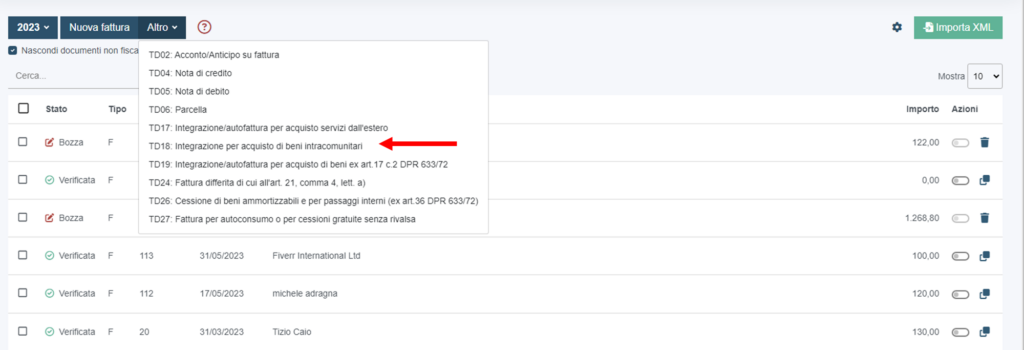
Click on the “Fatture vendita”

Then select “altro” and choose the “TD18: integrazione per acquisto di beni intracomunitari”
Then enter the sender, i.e. your supplier. If you have already entered the sender's name previously, simply enter the initials in the sender bar, alternatively you can enter it when the document is issued by clicking on the “+ mittente”.

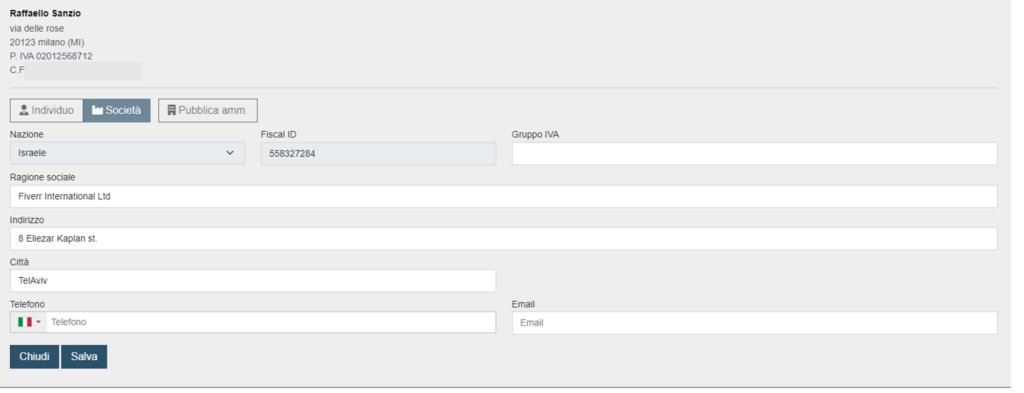
Once the customer has been entered and saved, start filling in the body of the document.
The data to be entered will be:
- number
- date
- service/product description
- amount
- rate
- linked invoice data, “+CIG/CUP/NSO” field
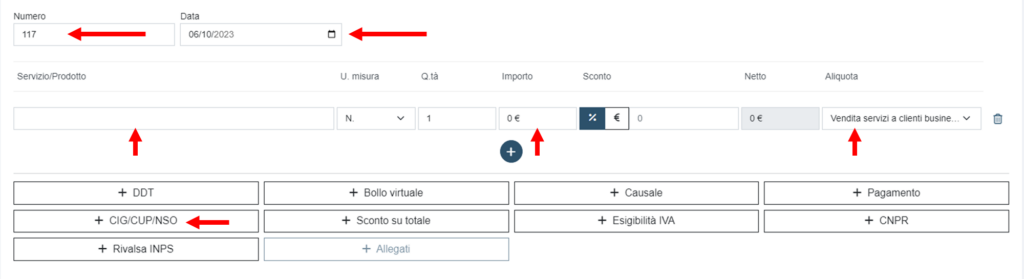
For numbering, we advise you to create a new sectional for this type of document. E.g. 1/autben,...., n/autben.
As date, you should enter the date of receipt of the invoice or the last of the month in question. E.g. if you received the invoice on 28 July, the self-invoice must be dated 28 July or 31 July.

Under service/product description: enter the simple wording “beni”.
Under amount enter the total of the purchase invoice. If the invoice has a currency other than the euro, please convert it first. You can use the daily exchange rates on this site: Oanda. As time reference use the date you entered in the date field.
In the rate field enter the VAT rate corresponding to the type of goods purchased.
The ordinary VAT rate is 22% while the reduced rates for specific goods are as follows:
- 4% for food, beverages and agricultural products (basic necessities)
- 5%, for certain foodstuffs (e.g. herbs)
- 10%, medicines and specific goods.
If you are in doubt about the rate to be applied, do not hesitate to contact us.

Click on "+CIG/CUP/NSO" to enter the linked invoice data. In the document menu select “fattura collegata”, in the document ID field enter the invoice number received, in the document date field enter the date of the purchase invoice.

Once you have completed the compilation, you must click on save, then on issue, and then on “invia fattura elettronica a SDI”.
Once transmitted, you will find your self-invoice in the list of sales invoices. You will be able to recognise the type of document by the wording: AF.
As usual, you will receive a receipt for the acquisition of the self-bill by SDI.

This is compulsory and there are penalties for late or non-submission of self-invoices. We advise you to be very careful when completing it.
