
Proxy for consulting the tax drawer
The tax drawer is a tool made available by the Inland Revenue Agency that allows you to view your tax information. It is a 'virtual' place at your disposal for the storage and use of your tax information.
Delegating the tax drawer to your consultant is of fundamental importance for consulting tax data and documents (e.g. previous declarations, single certifications, credits, etc.) useful for preparing your tax return.
Delegating your consultant is very simple and fast. Here is a step-by-step guide.
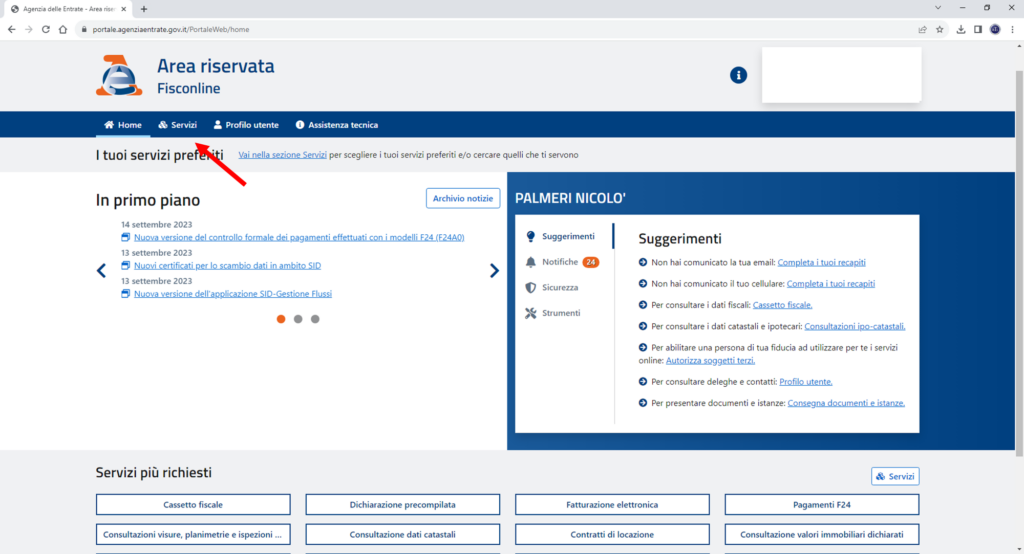
First you will need to access your personal page of the revenue agency through SPID, digital signature or fisconline credentials. Here is the direct URL to log in: Access Agenzia dell'entrate website.

After logging in, click on the services item.
In the next search bar enter: “Deleghe” and then click on “gestisci le tue deleghe”.

Then proceed by clicking on “Comunica una nuova delega”

At this screen, make sure that you are located on the “cassetto fiscale” item, enter the tax code of the intermediary you wish to delegate and click on “inserisci”. You will not need to fill in the validity period field. If you have one of the Partitaiva24 subscription plans active, the tax code to enter is as follows:
SCRRRT86L15G273E

At the end of the procedure you will find a screen with the result of the operation. Afterwards, remember to inform your advisor that you have made the proxy!