
Foreign management tool guide
You will only need to use the foreign management tool if you are in the flat rate scheme, with this tool you will obtain the F24 form to pay the VAT on foreign invoices received but don't forget to also make the self-invoices referring to the same purchases.
The foreign management tool allows you to generate your F24 form for the monthly payment of VAT on the purchase invoices you receive from abroad.
Each month, if you receive purchase invoices from abroad, you may have to integrate the VAT in Italy; pay close attention!
VAT must be paid on the 16th of the following month on the reference month of the invoices received. We therefore recommend that you use the tool between the 10th and 12th of the following month so as to be sure that you are in possession of all the invoices for the previous month.
For example, invoices that you received from foreign companies in January will result in foreign management fulfilments for you by the 16th of February.
Using the tool is very simple, but first you must be in possession of all the necessary documents.
- retrieves all foreign invoices and credit notes received in the reference month
- discard documents that are not invoices (e.g. receipt, pro-forma, transport documents, quotations, etc... are not invoices and should not be counted)
- discard foreign invoices for the purchase of goods from non-EU suppliers (such purchases have passed through customs and you have therefore already paid VAT on customs clearance, you should in fact have a customs bill for such purchases)
- discard also any invoices where VAT is present (if on some foreign invoices the supplier has already charged you the foreign country's VAT, i.e. the VAT field is not zero, then these documents will not be subject to any VAT billing and payment in Italy because the supplier will have treated you as a private individual)
You can now proceed to use the tool by accessing it from the menu on the left.
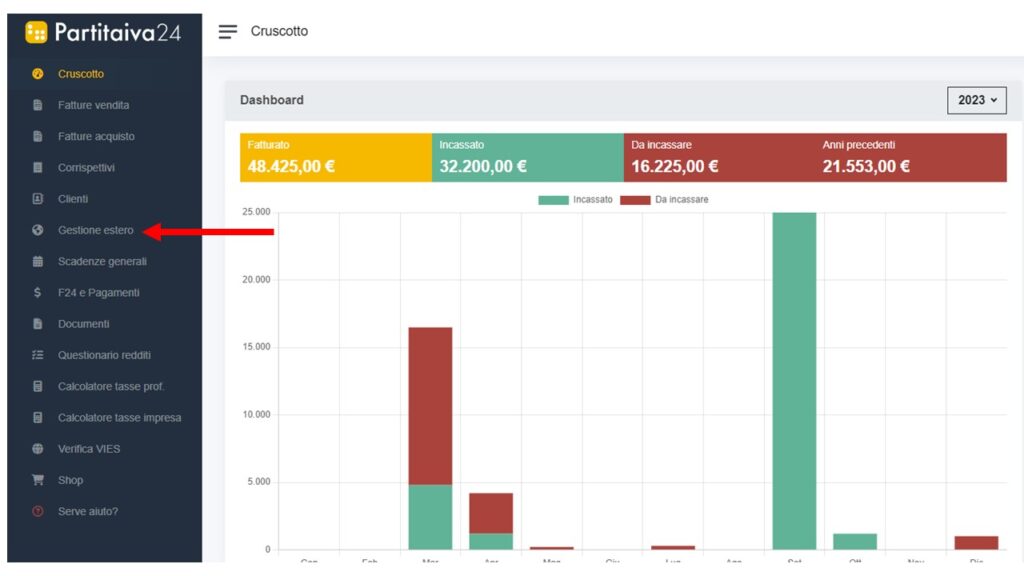
As soon as you get the tool, click on new count to proceed with the input of the invoice information.

Select “reference year” and “reference month”, remember that the reference month is the month in which you received the invoices. (e.g. if the reference month is September, the due date of the F24 for payment of the calculated VAT will be October).
Within the same calculation you can enter invoices that have the same month as the document date.

Proceed to enter the invoice data in the appropriate fields. Enter the supplier, the invoice number and the amount in euros (if it is a credit note, enter the amount preceded by a minus sign). If the invoice you have received is in a currency other than the euro, make the exchange before entering the figure. Take the exchange rate of the invoice date as a reference, to convert amounts we recommend this site: Oanda.
By clicking on the “+” button, you can gradually add as many lines as there are invoices on which to perform the calculation.
For your convenience, by clicking on the supplier entry, you will already find a number of predefined suppliers, which in our experience are the most frequent ones you will have to deal with.
In the event of a compilation error, you can always delete the line in question by clicking on the recycle bin icon.
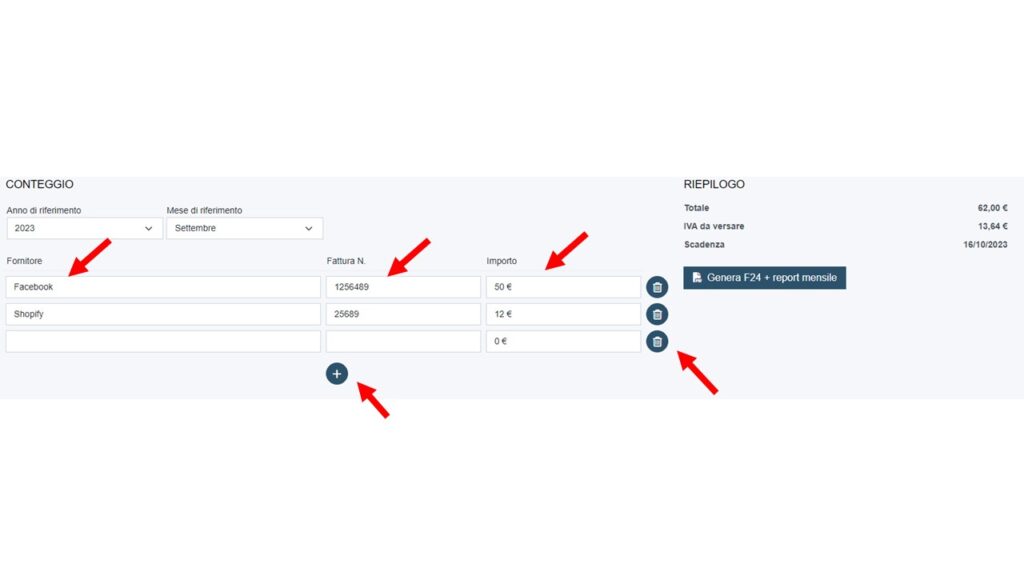
As you enter invoices, the calculation of the total and the VAT due will appear on the right-hand side in real time, as well as the due date of the F24 you are about to generate. When you have finished entering all your invoices, you can click on the “genera F24 + report mensile” button to download the F24 that you will have to pay using your bank's internet banking services.
Remember that once the F24 has been generated, the statement can no longer be modified. You will, however, be able to make further statements in case you have forgotten to enter some invoices.

Click on “genera F24 + report mensile” to download an F24 form and its summary report.

For the F24 payment, remember that you will have to proceed via your internet banking.
As these are general products and services, VAT will be calculated at the ordinary rate of 22%.
NB. Foreign invoices received for services of a banking-financial nature or similar, e.g. sumup invoices, stripe invoices, should not be included in the statement, and therefore no VAT should be paid on them in Italy.
If you do not pay the F24 form by the due date, you will have to file a “ravvedimento operoso” for late payment with interest and penalties before paying. In this case, simply contact us and we will tell you how to proceed.
If you would like to learn more about the foreign exchange tool, you will find a PDF guide (guida tool gestione stero) and an overview video below.
You will only need to use the foreign management tool if you are in the flat-rate scheme. With this tool, you will obtain the F24 form to pay the VAT on foreign invoices received, but don't forget to also make self-invoices for the same purchases.