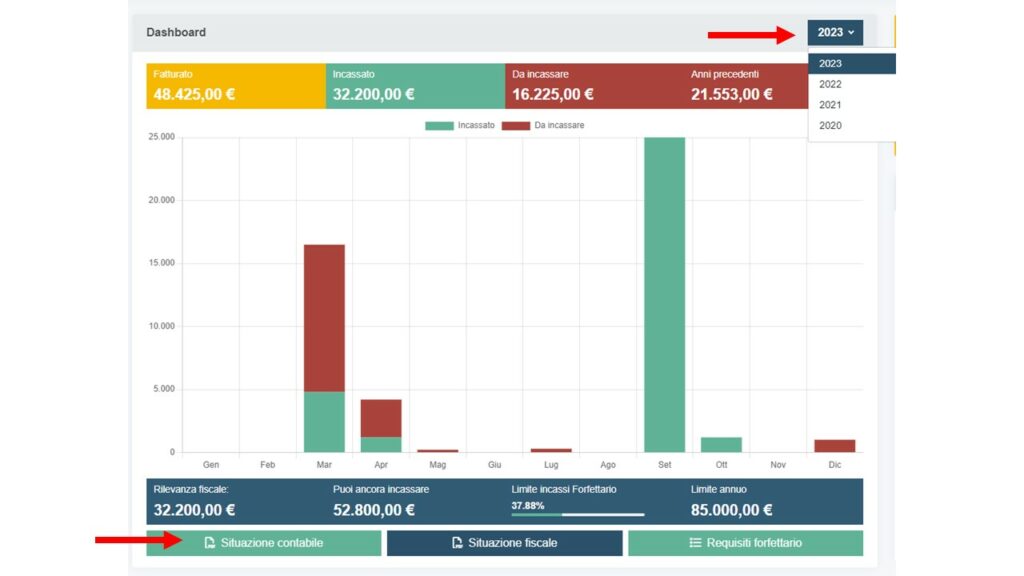
Accounting situation report
By clicking on the “situazione contabile” button you will be able to download a report of your receipts and invoices issued to date. Inside you will find your tax data, the date the file was downloaded and the data of the documents issued during the year.
This is an excellent document that can help you periodically in the management of your VAT account. To download the document, simply click on the “situazione contabile” tab.


By clicking on “situazione contabile” you can then download your accounting situation document in PDF.
IMMAGINE
In addition, if you have been a client of VAT number 24 for several years, you can also download your accounting situation for previous years. To download, first select the year you are interested in and then click on the accounting situation button as before.
Focus! The accounting statement is merely a list of the invoices issued in the year and any payments made, and this may differ from the tax situation if some invoices are not collected in the year of issue. See “situazione fiscale” for more details.